


Key Takeaways
- Choose MediaValet for an AI-powered DAM platform: Best for enterprise self-service content creation with governed templates and a complete DAM-to-template-to-DAM workflow.
- Choose Bynder for browser-based creative production: Best for teams that need native image, video, and GIF templating.
- Choose Canto for multilingual content creation: Best for organizations localizing branded assets at scale.
- Choose Brandfolder for measurable brand management: Best for teams that value asset analytics as much as template governance.
Templating tools that connect to DAM (Digital Asset Management) turn approved brand assets into reusable templates that teams can customize without breaking brand guidelines.
This guide compares the best options and explains the features that matter when scaling self-service content creation.
How Can Templating Software Enable Self-Service Brand Asset Creation?
Templating software turns approved designs into reusable templates that non-designers can customize within predefined rules. Thus, all teams create their own collateral without waiting for a designer, while creative teams still control the branding.
These are the three problems brand asset templating directly solves:
- Brand inconsistency across distributed teams: Templating limits customization to approved brand assets and editable fields, so every flyer, sales deck, or social post stays on brand
- Creative bottlenecks blocking content production: Instead of routing every content request through a designer, templating gives non-designers a governed way to produce finished collateral independently
- Off-brand asset risk in sales and marketing: Without a controlled creation process, teams often reuse outdated logos, images, or messaging. Templating ensures users only access approved assets and can edit only the fields intended for customization
What Are the Benefits of Using a Templating Solution That Connects With DAM?
Templating solves content creation problems, but it only governs what users can edit. A connected DAM platform governs where every approved asset comes from, where every finished piece goes, and who can access both.
Together, they create a single system for producing and managing branded content with benefits such as:
Brand Compliance Without Designer Involvement
A connected DAM gives every template access to the latest approved logos, images, fonts, and brand assets, so non-designers can personalize content without introducing unauthorized changes. Whether a sales rep updates a proposal or a regional marketer creates an event flyer, the finished asset stays consistent with brand standards.
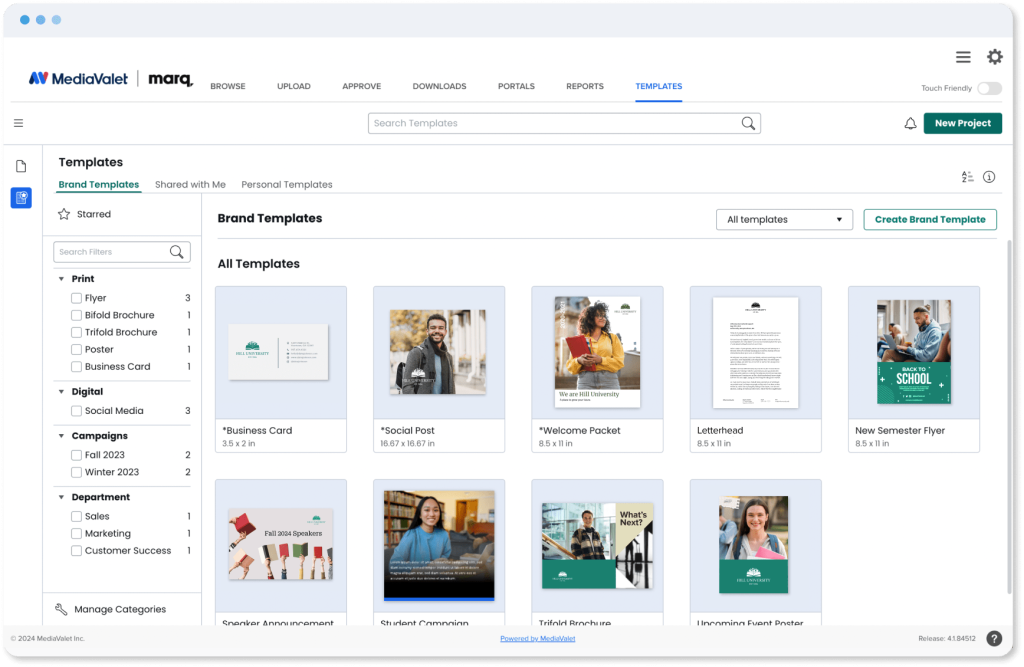
That level of control depends on templates that pull assets directly from the DAM, lock brand critical elements, and limit editing to approved fields. Role-based permissions add another layer of governance by ensuring each team only accesses the templates relevant to them.
Faster Content Production for Distributed Teams
The biggest advantage of self-service templating is speed. Sales teams, regional marketers, faculty, and franchise locations no longer wait for a designer to make routine updates, allowing branded content to move from request to distribution in minutes.
Per the 2026 DAM Trends Report, teams using DAM and templating together save 18 hours per week on brand initiatives. Teams using templating alone save roughly half that.
Look for browser-based template building (no InDesign license required), smart fields that automatically populate recurring information, and multi-format exports that produce digital and print-ready assets from the same template.
Creative Team Bandwidth for Strategic Work
When self-serve templates handle recurring requests such as flyers, bio cards, event promotions, and localized collateral, creative teams spend less time on production and more time on campaigns, brand development, and high-value design work.
As we see in this DAM and AI: Integrating Content Ecosystems report, adopting this approach consistently redirects creative capacity toward work that benefits most from professional design expertise.
You’d only need approval workflows that keep creative teams in control of what gets published without requiring them to build every asset themselves.
Finished Assets Governed Back Into the Library

Creating branded content is only part of the workflow. Teams also need to find, reuse, and distribute those assets long after they are created.
When templating connects directly to a DAM, finished pieces return to the governed library with their metadata intact, making them searchable, version-controlled, and ready for future campaigns.
So, look for automatic asset return, metadata preservation, and CDN distribution to keep every approved file connected to a single source of truth or digital brand library.
Which DAM Offers the Easiest Templating Tools for Teams to Quickly Build On-Brand Content?
These five DAM platforms each have a different approach to templating and brand governance.
| Software | Best For | Standout Templating + DAM Feature |
| MediaValet | Enterprise teams needing a full DAM to template to DAM workflow at scale | Approved assets flow into Marq templates, and finished content automatically returns to the DAM with governance intact |
| Bynder | Enterprise brand teams wanting native browser-based templating | Create image, video, and GIF templates entirely inside Studio without a third-party editor |
| Canto | Mid-market teams producing localized branded content | AI-powered Brand Studio adapts templates across markets while keeping every version on brand |
| Brandfolder | Marketing teams prioritizing brand governance and analytics | Content Automation combines governed templates with approval workflows and asset performance insights |
| PhotoShelter | Media-rich organizations distributing visual content | Connect approved DAM assets to Canva or Marq templates for rapid visual content production |
MediaValet

MediaValet combines an AI-powered enterprise DAM with browser-based templating, giving organizations a complete DAM to template to DAM workflow.
MediaValet Key Features
MediaValet’s templating value comes from three capabilities that work together: the Marq integration, Experience Portals, and AI-powered asset discovery.
Templating Powered by Marq
You can build templates in Marq using approved assets from the DAM, lock brand elements, and open only the fields non-designers need: contact details, event dates, image slots, local copy.
Non-designers open the template, fill in their fields, and export a finished piece. That piece saves back into MediaValet automatically, with metadata intact.
Experience Portals
Experience Portals give internal teams, partners, and agencies a branded destination for approved templates and finished assets. Instead of sharing files through email or local folders, organizations distribute governed content from one controlled environment with the right permissions already in place.
AI-Powered Search and Face Recognition
The asset that goes into a template has to be the right, current, approved one.
MediaValet’s AI auto-tags assets on upload, recognizes faces across images and video, and makes the entire library searchable by spoken word, on-screen text, object, color, and natural language.
Tip: Use Face Recognition to audit headshot libraries before building Marq templates that pull from them. You can bulk-tag and remove outdated photos, so templates always pull the right person’s image.
MediaValet Pricing
| Plan | Pricing |
| All tiers | Custom |
Explore MediaValet’s pricing details.
Where MediaValet Shines
- Microsoft Azure infrastructure: SOC 2 Type II, ISO 27001, GDPR, and FERPA compliant and HIPAA ready
- CI HUB integration lets designers access MediaValet files directly inside Adobe Creative Cloud, InDesign, and Photoshop
- CDN Linking publishes finished assets and templated content anywhere with a single URL
- Proofing powered by PageProof: templated pieces route for approval and return to the DAM on sign-off
MediaValet Customer Reviews
“What I like best about MediaValet is how intuitive and efficient it is for managing our team’s digital assets. The powerful search and tagging features let us find any brand image or marketing file in seconds, which saves us a lot of time every week. The platform also supports easy sharing and collaboration, making it simple for cross-functional teams to access approved assets and stay aligned.” Xiang L.
“We’ve been using MediaValet for over a year now, and it’s become an essential tool for our content and marketing operations. The platform is intuitive and makes it easy to organize, find, and share digital assets across departments.” Tomás T.
Who MediaValet Is Best For
- Enterprise and mid-market organizations managing large libraries of rich media who need a full DAM + templating loop with governance built in
- Marketing and creative ops teams in healthcare, higher education, media and entertainment, manufacturing, and nonprofit who need non-designers to produce on-brand content independently
See why enterprise teams choose MediaValet.
Bynder

Bynder offers Studio, its native templating module that supports asset creation in the browser. It’s best for teams that want templating without adding a third-party partner to their stack.
Key Features
- Studio (native add-on): for browser-based image, video, and GIF templates. You also get batch export and AI-powered image editing
- Figma and Photoshop files import directly into Studio, removing the rebuild-from-scratch step
- Finished assets save directly to Bynder DAM after creation
- Content Workflow module for approval routing (separate add-on)
- AI Search with similarity search across up to 500 assets
Pricing
| Plan | Pricing |
| All tiers | Custom |
Where Bynder Shines
- Studio supports video template creation up to 5 minutes, HD quality, directly in the browser
- Brand color palette locking applies across all template types, including video and GIF
Customer Reviews
“Overall, I love using the Bynder software, especially being able to customize templates for my unique branding,” shares a content creator on Capterra.
“One downside is that the platform can feel overwhelming at first because of the number of features and customization options. Some searches and uploads can also feel slower than expected when managing large asset libraries.” Courtney W.
Who Bynder Is Best For
- Global enterprise marketing teams where brand governance, in-browser video templating, and a fully native tech stack are the primary requirements
Here are the best Bynder alternatives.
Canto

Canto relaunched as Canto XI in October 2025, with Brand Studio as its flagship templating module.
Key Features
- Brand Studio (add-on): AI-driven localization and adaptation for markets and channels, plus multi-format export for print and digital
- AI Visual Search: find assets without relying on pre-existing metadata
- Approval Hub: review workflows for content approval before distribution
Pricing
| Plan | Pricing |
| All tiers | Custom |
Where Canto Shines
- Finished templated assets governed and saved in the DAM with the same metadata structure as all other assets
- Branded portals to distribute templates for easy access
Here are more DAM Canto alternatives to consider.
Customer Reviews
“Honestly, before Canto, I was spending a lot of time trying to locate the most recent versions of things like logos, etc. With Canto, I simply search for what I need, click on the document, and I am good to go.” Brion S.
“As a smaller use case, some of the new features like Brand Studio look amazing, but they aren’t realistic for us as our requirements are weighted differently to the different packages they offer.” Peter B.
Who Canto Is Best For
- Mid-market marketing teams managing multi-market content distribution who need AI-powered templating with localization, without enterprise-level complexity or cost
Brandfolder

Brandfolder (part of Smartsheet) is a mid-market DAM with strong asset analytics and two distinct content tools: Brandguide and Content Automation for brand governance and templating.
Key Features
- Content Automation (Design Huddle-powered): digital, print, presentation, and video templates with lockable elements; non-designers customize open fields and download finished pieces
- Brandguide: a live digital brand guidelines hub where logos, colors, fonts, and usage rules are published and kept current, separate from the templating workflow
- Brand Intelligence: AI-powered auto-tagging and smart search across the asset library
Pricing
| Plan | Pricing |
| All tiers | Custom |
Where Brandfolder Shines
- Asset usage analytics show which assets are being downloaded and by whom, giving brand teams data to justify library decisions and retire underperforming content
- Smart CDN auto-updates embedded asset links when a new version is approved, so web placements don’t require manual link swaps
Customer Reviews
“I use Brandfolder to distribute branded templates to field teams and appreciate how it allows me to store reusable assets for non-creative team members. I like the level of control it gives me without requiring me to be hands-on all the time.” Chris R.
“By far our biggest frustration has been the PrintUI templating tool, which was initially an add-on we opted into. Over the years, it’s become increasingly buggy and is now essentially unusable.” H Q on G2.
Who Brandfolder Is Best For
- Mid-market marketing and creative ops teams where asset performance analytics are a primary requirement, and where templating is secondary to DAM governance and distribution
Read about the best DAM Brandfolder alternatives.
Real-World Results From Integrated DAM and Templating
Self-service content creation only works when governance keeps pace. These organizations combined MediaValet and Marq to give non-designers the freedom to create on-brand assets while reducing creative workloads and keeping every finished piece connected to the governed DAM.
PT Solutions

PT Solutions is a healthcare organization with 4,500 employees and 550 clinics across 25 states.
Before MediaValet and Marq, version control was breaking down, brand inconsistencies were multiplying, and turnaround times for localized collateral were measured in weeks.
After implementation:

- Sales reps build clinic-specific flyers, bio cards, and event promotions the same day they need them
- Templates include built-in instructions so anyone can produce finished, print-ready collateral without contacting the creative team
- Finished pieces are uploaded from Marq directly into MediaValet and pushed automatically to branded portals
Malia Hostetler, Senior Manager of Creative Solutions, says, “Now, when our sales team needs something, they don’t have to wait. They can open the template, drop in the details, and get it out the door the same day.”
University of Tulsa

Post-pandemic staff reductions left the Strategic Marketing and Communications team at the University of Tulsa managing 2,500+ requests in 14 months with no capacity to absorb them.
After implementing MediaValet and Marq:
- 3-day review cycles on templated content dropped to zero while maintaining 100% brand consistency
- Brand champions across campus now produce digital screens, event flyers, and department-specific assets independently using locked Marq templates
- 2,500+ requests tracked in 14 months, with measurable reduction in ticket volume as self-serve adoption grew
Creative Director Amanda Hodges: “Marq makes it foolproof. People can’t mess it up too bad, and that’s been smooth sailing.”
Side Note: Want to see how the DAM and templating workflow works before a sales conversation? MediaValet offers an interactive DAM demo where you can explore the platform at your own pace.
Start Building On-Brand Content at Scale With MediaValet
MediaValet brings together AI-powered Digital Asset Management, browser-based templating through Marq, and enterprise governance to help marketing, sales, and creative teams scale self-service content creation without sacrificing consistency or control.
Book a demo and see how a connected DAM and templating workflow can simplify content creation across your organization.
Related Articles

Brand Management

Brand Management

Brand Management

Brand Management